
 Back to all posts
A résumé tells an employer what you have done. A LinkedIn carousel can show them how you think.
That is what makes the format interesting for job seekers.
LinkedIn allows users to upload documents such as PDFs or presentations that people can swipe through directly in their feed. For candidates, this creates an opportunity to explain a project, break down a process, share an industry insight, or add context to an achievement that may only get one line on a résumé.
You do not need to become a “content creator” to use them well. You just need something useful to say.
What does a LinkedIn carousel look like?
A good carousel usually takes one idea and tells the story over a few slides.
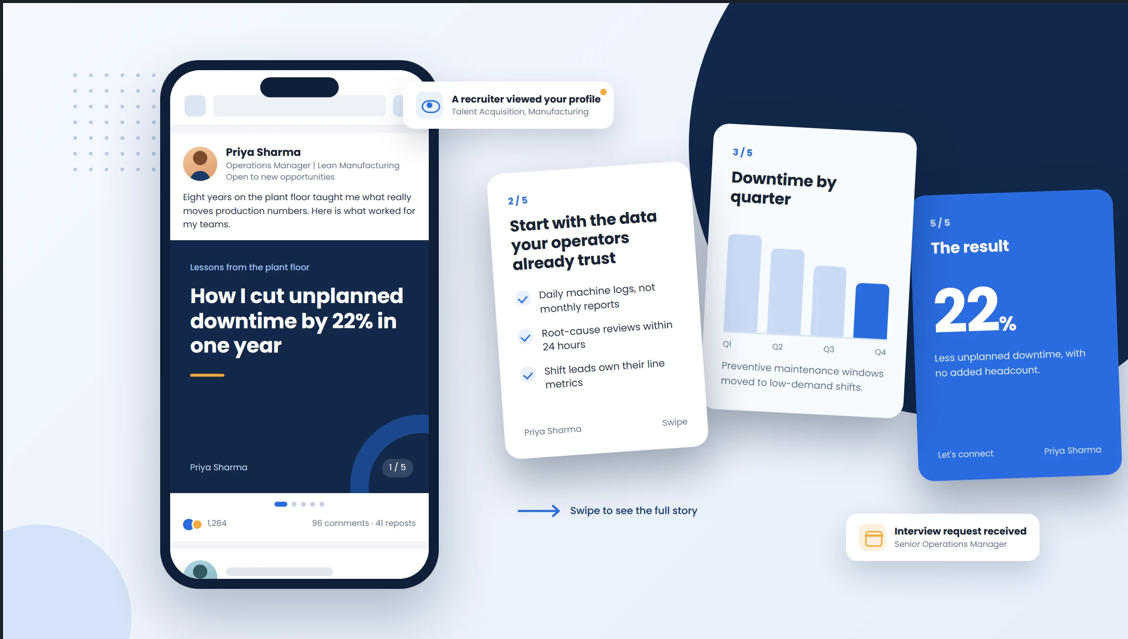
For example, imagine an Operations Manager whose résumé says:
Reduced unplanned downtime by 22%.
That is a strong result. But a carousel could make it much more meaningful.
It might be structured like this:
Slide 1: The hook – How I cut unplanned downtime by 22% in one year
Slide 2: What was causing the problem and where the data came from
Slides 3–4: The changes made and how the approach worked
Slide 5: The result – 22% less downtime, with no added headcount
The reader sees the achievement and gets a glimpse of the thinking behind it.
Keep the structure simple. Five to eight slides is usually plenty. One main idea per slide, enough white space to read comfortably, and a clear takeaway at the end.
Why this can work well for job seekers
LinkedIn is full of profiles saying things like strategic thinker, results-driven professional, or experienced project manager.
A carousel gives you a chance to demonstrate one of those claims instead.
A marketer could walk through a campaign that improved conversions. An IT professional could explain how they approached a migration. A recruiter could share what they learned while filling a difficult role. Someone in finance could show how they improved a reporting process.
That makes expertise easier to understand.
What should you post about?
Start with your actual work. Good topics could include a project you are proud of, a problem you solved, an industry lesson, a process you improved, or something you learned while developing a new skill.
If you are changing careers, a carousel can also help explain how your existing experience transfers to the field you want to enter.
The key is to avoid turning it into a visual version of your résumé.
Compare these two ideas:
“5 Reasons You Should Hire Me”
versus
“3 Lessons I Learned Managing My First ERP Implementation”
The second gives people a reason to read even if they are not currently hiring. And that makes it much more natural.
Keep it useful, not overly polished
You do not need complicated graphics. Write the idea first. Design it second.
A clear headline, readable text, consistent layout, and a few relevant visuals are usually enough. Tools such as PowerPoint, Canva, or Google Slides can all be used before exporting the document as a PDF for LinkedIn.
More importantly, keep your own voice. Generic AI-written advice placed into a nice template is still generic advice. Your experience is what makes the carousel worth reading.
Working on your LinkedIn presence? Read our 2026 Job Search Plan for Canada for more ways to combine LinkedIn, outreach, applications, and interview preparation.
Remember, visibility is only one part of the search
A strong carousel may encourage a recruiter to visit your profile, give someone a reason to connect, or help your network understand what you do.
But it does not replace targeted applications, networking, interview preparation, or direct outreach.
At BITS Recruiting, we see LinkedIn working best when it supports a broader job-search strategy. A carousel can help people notice your expertise. What you do with that attention still matters.
If someone relevant engages with your content, that may even create a natural reason to start a conversation. Our guide to Job Search Cold Outreach: LinkedIn and Email Messages That Get Replies covers how to do that without making the interaction feel forced.
The goal is not to post more. It is to make what you know easier to see.
Exploring your next opportunity?

Key Takeaways
- LinkedIn carousels can help job seekers show expertise, not simply list experience.
- A simple 5–8 slide structure is enough: hook, context, approach, result, and takeaway.
- The strongest carousel ideas usually come from real projects, problems solved, or lessons learned.
- Use carousels alongside applications, networking, and outreach rather than treating content as the whole job-search strategy.
FAQs
Do I need design skills to create a LinkedIn carousel?
No. Clear content matters more than advanced design. A simple PowerPoint, Canva, or Google Slides template with readable text and consistent formatting is usually enough.
Do carousels only work for marketing or creative professionals?
Not at all. IT, engineering, operations, finance, HR, healthcare, project management, and other professionals can use them to explain projects, processes, results, or industry knowledge.
Should every carousel mention that I am looking for a job?
No. Most of your content should focus on what you know. Your LinkedIn profile and occasional job-search updates can make your availability clear without turning every post into an application.
Together, we build success stories